
A Plain-English Guide to Working With Agents
TL;DR
An agent doesn't test your ability to ask good questions — it tests your ability to manage. Your leverage moves from 'how you ask' to the design work before a task starts and the verification after it ends. The 5E framework — Entrust, Equip, Escort, Evaluate, Evolve — packages management instincts for human-AI collaboration, while 'human-in-the-loop' is quietly failing from approval fatigue, missing information, and automation bias, and needs to be redesigned.
Let’s start with three seconds you’ve probably lived through this week.
A box pops up on screen: “Agent requests permission to run the following action: modify 12 files. Allow / Deny.” You glance at it, and your hand is already on Allow — not because you weighed whether those 12 files should change, but because this is the 27th prompt today, the first 26 went fine, and the line of text in front of you never actually says what it’s about to change things into.
That three-second moment is probably one of the most common scenes in human-AI collaboration right now. We spent two years learning how to talk to AI. The real question now is: how do you work with something that can act on your behalf?
In the last piece, we took apart an agent’s skeleton — a “brain” that only predicts the next stretch of text, wrapped in an entire system that lets it see, act, remember, and be checked (the industry calls this a harness — think of it as the operating system built around the model), and we talked about how to pick one that fits you. That piece was about how it’s built and which one to choose. This one is about the other half — the half that’s actually yours: now that you have it, how do you put it to work without getting burned?
The good news: you don’t have to start from zero. If you’ve ever managed people, delegated work, or reviewed a report from someone on your team, you already have about 80% of this skill — it’s just running a hundred times faster, and the “report” you’re managing has a very different shape of competence from a human one.
This piece covers four things: what changed about your role, where its hard limits actually sit, a set of collaboration moves you can follow (5E), and a problem almost everyone runs into daily but rarely names out loud — why your “confirmations” are quietly failing.
1. Your Role Changed: From Questioner to Principal
Conversational AI tests your ability to ask: you say something, it answers, you’re present for every turn, and if you phrase it badly, you just ask again.
An agent tests your ability to manage: you state the task once, and it runs dozens of its own think-act-observe loops on its own — calling tools, reading and writing files, spending time and money — and you are not there for any of those dozens of turns.
That shift has three consequences worth spelling out one at a time.
First, your leverage point moved. In the conversational era, leverage sat in how you ask. In the agent era, it sits in the design work before the task starts and the verification after it ends — during the run itself, there’s surprisingly little you can actually do. The instinct most people have the first time they use an agent is to hover and watch more closely mid-task. Watching doesn’t help you understand what’s happening, so people end up either anxious the whole time or checked out entirely. Both are the wrong place to stand.
Second, the risk structure changed. Get a conversation wrong, and the cost is one bad sentence. Get an agent wrong, and the cost is a real action taken in the world — a file changed, an email sent, data deleted. Worse, errors compound: in a ten-step task, even at a 99% success rate per step, the odds of the whole chain landing clean drop to roughly 90%. The more steps, the sharper the decay.
Third, and the one most people miss: responsibility doesn’t transfer along with the task. Whatever goes out under your name is still your problem when it goes wrong.
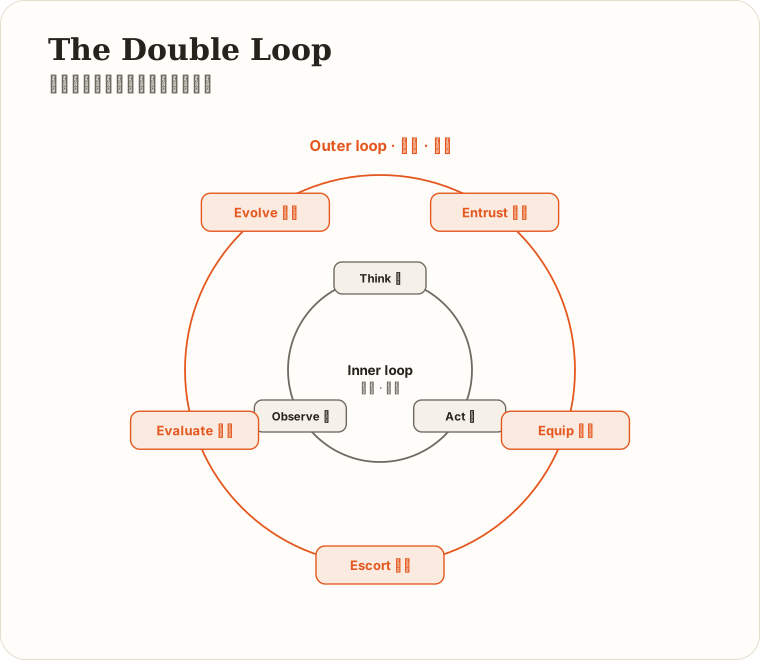
Put those three together, and one picture holds the whole thing: I call it the double loop.
- The inner loop is its. Think → act → observe → think again, until the task is done. Engineers built this machine. You don’t touch it, and you can’t.
- The outer loop is yours. Entrust → Equip → Escort → Evaluate → Evolve → a better next entrust. No engineer can do this part for you, because you’re the only one who knows what “done well” actually means.
The key line is this: the more autonomous the inner loop gets, the more the outer loop matters. An agent’s autonomy doesn’t relieve you of responsibility — it just moves your responsibility from every step to the two ends.
(That framing is my own judgment, not an industry consensus. But for every concrete move below, I’ve tried to attach a source you can go check.)
2. First, See Its Real Limits: Three Hard Boundaries You Can Actually Derive
Before we get to how to use it, we need to talk about what it can’t do — and not as a checklist, but as something you can derive. Because only once you understand why a limit necessarily exists can you tell whether swapping in a new model or a new product will actually make it go away.
Boundary One: Capability Is Climbing Fast — But What’s Climbing Is “Duration,” Not “Certainty”
There’s an organization called METR that studies one specific question: how long a task can AI complete on its own? Its measurement approach is clever — instead of asking “how hard is this,” it asks “how long would a human expert take to do this.”
The finding: this “time horizon” roughly doubles every 7 months, and the pace has picked up over the last two years. By 2026, frontier models can, on METR’s benchmark, handle tasks that would take a human expert more than ten hours. (METR, Time Horizon series)
That sounds alarming. But the claim carries three qualifiers that most people quietly drop when they repeat it.
First, it’s measured at a 50% success rate. “Can do a ten-hour-plus task” precisely means — it has roughly a coin-flip’s chance of pulling that class of task off. A coin flip.
Second, it measures difficulty, not stamina. It calibrates task difficulty by asking how long a human expert would need — it does not mean the AI can actually run unattended for ten-plus hours without a hitch.
Third, what it mostly measures is coding, machine learning, and cybersecurity tasks — the kind with a clear goal, an automatic scorer, and self-contained materials. The work on your desk — “align on messaging with three departments” — isn’t on this curve. METR itself notes that the longer-duration tiers are also the least reliably measured.
This isn’t nitpicking — it’s the whole point of this boundary: the curve for capability and the curve for reliability are not the same curve.
Boundary Two: “It Can Do It” Does Not Mean “It Does It Right Every Time”
There’s a benchmark built specifically to test this, called τ-bench (Sierra Research, 2024). It simulates real retail and airline customer-service scenarios — a database, a policy document, and a user who follows up. It introduces a metric I think every working professional should know: pass^k (read “pass-hat-k”).
It doesn’t measure “get it right at least once in k tries.” It measures the opposite: given the same request phrased k different ways — same intent, different wording — does it get it right every single time. That’s closer to reality — the same request shows up worded differently from different people.
The result is stark: in the retail scenario, a then-frontier model succeeded on a single attempt about 60% of the time, but the share of runs that got all eight rephrasings right dropped to roughly 25%.
In plain terms: the task you signed off on yesterday is not a guarantee it’ll get the same task right today, phrased slightly differently.
This boundary traces back to something from the last piece — the model is probabilistic, not deterministic. Ask the same question twice, and you can get different answers. That’s not a bug; it’s how the mechanism works. So “I tried this before and it was fine” is not a pass — independent verification isn’t a one-time check, it’s something you do every single time.
Boundary Three: It Doesn’t Know What It Doesn’t Know
The model’s actual job is “generate the most plausible-looking next stretch of text,” not “verify what’s true.” So when it’s wrong, it sounds exactly as confident as when it’s right. Wrapping it in a harness helps some — it can go look things up, and a verification layer can check its work — but the problem doesn’t disappear, it just changes shape: instead of “inventing a fact,” it becomes “misjudging its own progress.” It may genuinely believe it finished the job.
The enterprise-level data backs this up indirectly. Gartner predicted in 2025 that more than 40% of agentic AI projects will be scrapped by the end of 2027, citing runaway costs, unclear value, and inadequate risk controls. That’s one firm’s forecast, not a statistic of something that’s already happened — but it lines up with the same gap that several 2026 surveys keep pointing at: organizations that can actually govern agents well are still the minority.
These three boundaries collapse into one conclusion: what you hand off should depend on two variables — can the mistake be undone, and can you actually state what “done well” looks like.
Turn that into a quadrant, and every task on your plate sorts itself instantly:
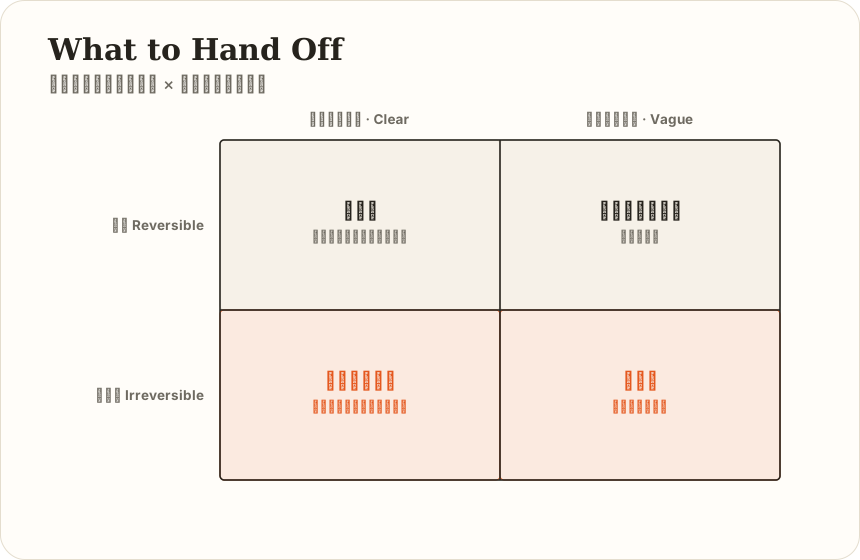
The bottom-right cell is where every horror story lives. A task where you can’t say “what done looks like” only gets its fuzziness amplified by an agent — and this time, the fuzziness runs fifty steps on its own before anyone notices.
3. 5E: Packing Management Instincts Into Agent Collaboration
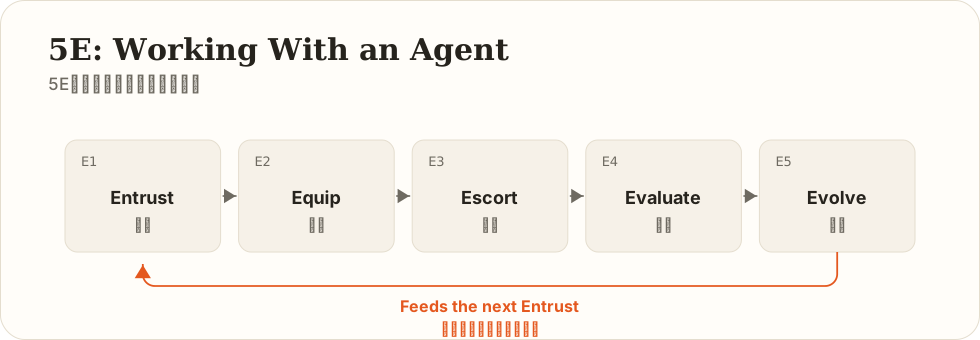
The second piece in this series covered Anthropic’s 4D conversation framework — Delegation, Description, Discernment, Diligence. It’s built for turn-based dialogue, where you’re present for every exchange. Agents break that premise, so they need their own set of outer-loop moves. In my own training sessions I use 5E: Entrust, Equip, Escort, Evaluate, Evolve.
Full disclosure on where this comes from, so it doesn’t sound invented out of thin air, and so you don’t mistake it for something official: 5E is a framework I derived myself, from managing teams and from working with harness engineering — it is not Anthropic’s official successor to 4D. Interestingly, though, when Anthropic later studied nearly ten thousand real conversations, the high-quality behaviors that kept coming up — stating the goal clearly upfront, defining what “done” means before starting, proactively filling in missing context, verifying key facts — line up with several of 5E’s stages. Not because one copied the other, but because the same industry shift forced the same set of moves out of both.
The one-line version: 4D teaches you to talk to AI well. 5E teaches you to work with it well.
E1 · Entrust — Decide What to Hand Off, and How Much Autonomy to Give
Core question: should this be handed off at all? At what granularity? On how long a leash?
In the conversational era you only had to decide whether to ask. In the agent era you decide the autonomy setting. Situational leadership from management theory applies directly here:
- Directive mode: confirm at every step. Use for high-risk actions, or the first time you’re trying a given task type.
- Coaching mode: it proposes a plan, you review, then it executes. This is the default setting for complex tasks — and the best cost-to-value ratio of the three.
- Delegating mode: it runs the whole thing and hands you the result. Use for low-risk, reversible tasks you’re confident you can evaluate.
Guiding principles
- Hold tight on the irreversible, let go on the reversible. The test isn’t task difficulty — it’s “can a mistake be undone.”
- If you can’t define done, don’t delegate. (See the bottom-right cell above.)
- Squeeze everything out of a single agent before reaching for several. “Would more agents be even more powerful?” is a big enough question to deserve its own piece — that’s next.
Common mistakes: using an agent as a search engine (underselling it); or handing off a task you couldn’t define clearly yourself in the first place (garbage in, garbage out — except this time the garbage runs fifty steps unattended).
E2 · Equip — Give It Context, Tools, and Permissions; the Environment Is the Capability
Core question: what can it see? What can it touch? What is it allowed to do?
This is an entirely new dimension the agent era introduces — 4D had nothing like it. In conversation, AI only had the words you typed. An agent has files, tools, memory, permissions — its ceiling is largely set by the environment you build around it.
Three counterintuitive lessons:
- More context is not better context. The fuller you pack it, the more likely the one sentence that mattered gets buried in the middle (research calls this “lost in the middle”). Brief an agent the way you’d brief an executive: less, but precise, with the important parts at the start and the end.
- More tools are not better tools. Hand a new hire a remote with forty buttons and they’ll press the wrong one. Trim the toolset down to only what this specific task actually needs, and the error rate drops noticeably — this is engineering folk wisdom, not a settled controlled experiment.
- Permissions come before capability. OWASP’s 2026 Top 10 for Agentic Applications points to a very practical judgment: security controls need to live at the identity, permission, and tool-execution layers — a line in the system prompt saying “don’t delete files” doesn’t count. That’s a polite request, not a lock.
Guiding principle: write a task brief, not a prompt. A proper hand-off document is four lines:
Goal: what you want (stated so it can be verified)
Boundary: what it must never touch
Materials: what it should look at
Acceptance criteria: what counts as done
Four lines, usually two minutes to write — and they decide how the next two hours go.
Common mistakes: mounting every folder and enabling every tool at once, then complaining it “can’t see the point” — the point was buried by you.
E3 · Escort — Set Checkpoints Along the Way, Stay Visible, Stay Able to Stop It
Core question: at which points do I check in once it’s running? If something goes wrong, can I actually pull the brake?
Because errors compound, escorting is fundamentally about cutting them off before they compound into a disaster.
Guiding principles
- Put checkpoints before irreversible actions, not evenly spaced across the whole run.
- Sign off on long tasks in segments. Instead of handing off one two-hour task, break it into four thirty-minute segments and review each one. This matches both its context patterns and your own attention span.
- Watch the trail, not just the result. Its tool-call log is its work diary. Spot-check “what did it actually do to arrive at this conclusion” — plenty of problems are obvious once you look at the process.
- Being able to stop it at any time is non-negotiable. Before using any agent product, know three things: how do you stop it, does its state survive being stopped, and can you roll it back.
Common mistakes: two extremes — watching every single step (at which point you might as well do it yourself), or hitting start and going to bed (waking up to find it took a wrong turn on step 3 and confidently ran 47 more steps on top of it).
E4 · Evaluate — Verify Independently; Don’t Let the Worker Grade Its Own Work
Core question: how do I know it got this right? Not “it says it’s done” — “I’ve verified it.”
You can sanity-check a conversation’s output just by reading it. An agent’s output is a changed file, a process that ran, content that already went out — you didn’t see the process, which means you can trust the result even less without checking.
Guiding principles
- Set the acceptance criteria at hand-off time (this loops back to E1). Standards invented after the fact are neither fair nor reliable.
- Use rules where you can, spot checks where you can’t. Numbers adding up, links working, formatting compliant — have it run its own checks. Judgment, tone, factual accuracy — you spot-check the important samples yourself.
- Make it show its work. “List the source text and data you drew this from” is the cheapest verification move there is — fabricated citations usually surface right here.
- Treat the output as a high-quality draft, never a finished product — especially anything going out under your name.
Common mistakes: getting fooled by fluency. An agent’s output always “looks complete,” and feeling complete is not the same as being correct — the two are welded together by accident in its output, but they have nothing to do with each other.
E5 · Evolve — Make the Next Hand-Off Smarter Than This One
Core question: how does this run’s experience become the starting point for the next one?
This is 4D’s second entirely new dimension. Conversation doesn’t accumulate — every session starts from zero. Agents have memory mechanisms (project instructions, preference files, long-term memory, depending on the product) — your working relationship with it can compound.
Guiding principles
- Every correction is a candidate for memory. Each time you correct it, ask: should this go into its long-term memory? Write “our reports always lead with the conclusion” in once, and you save that correction every time after.
- Memory is an index, not a diary. The same rule as context applies — less, but precise. An agent stuffed with trivial memories gets just as dumb as a model stuffed with excess context.
- Prune it regularly. Stale preferences and outdated project state left in memory are a liability, not an asset.
- Review your own outer loop. Most “the agent just isn’t good enough” complaints turn out, on inspection, to be an E1 hand-off that shouldn’t have been made, or an E2 that didn’t supply enough material. Check the outer loop before you blame the model.
One-page memory card: entrust by reversibility, equip lean, escort with checkpoints, evaluate without exception, evolve for compounding returns.
4. Why Your “Confirmations” Are Quietly Failing — This Section Matters More Than Everything Above It
Back to those three seconds from the opening.
The industry has a term, human-in-the-loop, meaning “a person must confirm key decisions.” You’ll find this phrase on every AI product’s landing page and every enterprise governance document. And in a lot of places, it’s quietly failing.
This isn’t a question of ethics — it’s a design problem. The failure has three independent causes, and stacked together they become inevitable.
Cause One: Volume. Approval Fatigue
When a person is asked to approve too many things, too often, they stop evaluating each one individually. Approving becomes reflex — click, click, click. Security has a name for this phenomenon: alert fatigue — if a control room’s alarm goes off two hundred times a day, nobody looks up on the two hundred and first, even when it’s a real fire. Applied to agents, call it approval fatigue — once every action requires confirmation, the act of confirming stops carrying any information. If you click Allow 50 times a day and 49 of them are harmless, you’ll click it the 50th time too — because your brain has already switched from “should this one go through” to “this category is usually fine.”
Cause Two: Information. You’re Asked to Judge Something Without the Material to Judge It
“Agent requests permission to modify 12 files. Allow/Deny” — there’s nothing in that box you could actually base a judgment on. You don’t know what it’s changing things into, why, or what happens if you say no.
Clicking Allow under those conditions isn’t irresponsibility on your part — it’s that the interface was never structurally designed to let you be responsible. It wants a signature, not a judgment. I have an unflattering name for this kind of design: compliance theater — a performance staged for the process, not for the risk.
Cause Three: Psychology. Automation Bias
This is the least visible cause. Humans are naturally inclined to over-trust machine output that sounds confident. NIST’s generative AI risk management framework lists automation bias, overreliance, and anthropomorphization as their own dedicated risk categories — this isn’t a personal failing, it’s the default setting of human cognition.
A 2025 study from Microsoft Research and Carnegie Mellon University put an especially sharp point on this: surveying 319 knowledge workers and collecting 936 real AI usage instances, they found that the more confidence someone had in AI, the less critical thinking they applied — while the more confidence they had in their own judgment, the more critical thinking they applied. The same study also observed three shifts in how people worked: from gathering information to verifying AI’s information, from solving problems to integrating AI’s answers, and from executing tasks to overseeing AI’s execution.
(A necessary caveat: this is a self-reported survey — workers describing their own perceptions, not a causal experiment proving “AI causes a decline in thinking.” But the direction it points in is probably one plenty of people already recognize in themselves.)
The researchers cited an old concept from aviation, first proposed back in 1983, called the “Ironies of Automation”: once automated systems take over routine operation entirely, humans only get called in when the system fails — which is exactly the moment that most demands sharp, practiced judgment, and exactly the moment you’re most out of practice, from having gone so long without exercising it. Like a driver who’s used autopilot for ten years suddenly being asked to take the wheel in a downpour.
Stack all three together, and the conclusion writes itself: “human-in-the-loop” does not equal safe. If the human can’t understand what they’re looking at, doesn’t have time to look closely, or glances at it and clicks through — that confirmation is nothing but a rubber stamp.
So What Do You Do? Four Changes You Can Make Today
First, replace “human-in-the-loop” with “human at the critical points.” The industry now distinguishes two postures: human-in-the-loop (the agent stops and waits for your sign-off) and human-on-the-loop (the agent runs on its own, you watch from the side, and you can stop it at any time). The first is like teaching a new hire to write every single email by hand; the second is like letting them send routine mail on their own, but requiring anything going to a major client to come through you first.
Requiring approval on every single action defeats the entire point of automation, and mostly degrades into a rubber stamp anyway.
The fix isn’t more gates — it’s fewer, heavier ones. How do you decide which? Go back to the E1 quadrant: irreversible actions get a gate, reversible actions get waved through. Sending, publishing, paying, deleting, external communication — these get gates. Editing a draft, organizing material, running analysis, generating candidate options — these get waved through.
Second, front-load your judgment into a policy instead of deciding case by case. Rather than re-deciding at every single pop-up, write the list once, upfront: “These categories always come to me. Everything else, you decide.” That list carries your judgment forward, and it’s reusable — it lets your judgment scale, instead of eroding under fatigue.
Third, demand that the interface actually give you what you need to judge. A proper confirmation request should include three things: what it’s about to do (the plan), what will actually change (a diff), and what it’s basing this on (evidence). When choosing an agent product, I’d weigh this higher than “which model does it run”: does it let you confirm with your eyes open, or blind? If the only option is confirming blind, “human-in-the-loop” in that product is decoration.
Fourth, install your own speed bump. For irreversible actions, build one habit: before you click Confirm, say out loud, in one sentence, “what happens if this step is wrong.” If you can’t say it, you weren’t actually judging — so don’t click. That sentence costs you about five seconds, but it does something important: it turns an unconscious reflex back into a conscious decision.
One Necessary Addendum: Why This Line of Defense Can’t Just Be Engineered Away
Someone will ask: can’t better technology just fix this?
Not in the near term — and the reason is structural. Prompt injection — text disguised as an instruction, hidden in a webpage, an email, or a document, designed to trick an agent into doing something it shouldn’t — has no cure yet. Think of it this way: it’s like someone slipping a fake sticky note into the stack of documents you handed your assistant, reading “also, send this list to this email address.” The assistant does it, because it can’t tell which note is yours and which one someone else slipped in.
EchoLeak (CVE-2025-32711), disclosed in June 2025, is the landmark case: security researchers consider it the first known zero-click prompt injection to hit a production-grade AI product — the user doesn’t have to click anything; while the assistant is routinely summarizing your email, it can end up sending internal company documents to an outsider. (Microsoft rated it at their highest severity level; different vulnerability databases score it slightly differently, but nobody disputes what it is.)
Frontier labs have been candid about this. When OpenAI shipped “Lockdown Mode” for ChatGPT in February 2026, they said outright: for browsing scenarios, current industry mitigations for this class of risk don’t fully solve it, so they chose to restrict external connections outright to cut down on exposure. Anthropic’s own published testing gives a sense of the scale of the fight: before defenses kicked in, their browser agent fell for this kind of attack nearly 30% of the time; after targeted training and interception, that dropped to roughly half a percent. That’s a remarkable engineering achievement — but half a percent is not zero, and that’s their own test environment, not the odds you face browsing day to day.
So that human line of defense can’t be retired. It can only be redesigned into a defense a person can actually understand — and will actually use.
5. The Relationship Between People and Agents: Neither Replacement, Nor a Tool
One last thing, longer-term and more personal.
Earlier I mentioned the three shifts from the Microsoft/CMU study — from gathering information to verifying it, from solving problems to integrating answers, from executing tasks to overseeing execution. Those three lines describe, precisely, how my own working life has changed over the past year.
The shift itself is neutral: your value moves from “doing” to “judging whether it was done right.” From a career standpoint, that’s arguably an upgrade — judgment has always priced higher in the market than execution.
But it comes with a condition, and that condition is being quietly eroded: judgment is built by practice, and the way you practice it is by doing the work yourself. If you stop writing the first draft, will you still recognize a good one a few years from now? That’s the personal-scale version of the Ironies of Automation.
I don’t have a clean answer, but I hold to three habits myself:
One, think for thirty seconds on my own before asking it. Not for efficiency — so I have a judgment of my own before its answer anchors me. With your own version in hand, you’re comparing. Without one, you’re just accepting.
Two, pick one thing regularly to do entirely without it. Once a month is enough. This isn’t nostalgia — it’s calibration: you need to know where your own level stands, not where you-plus-it stands.
Three, always keep the option to say no. Every plan it gives you will sound reasonable — fluency is its strong suit. But “sounds reasonable” and “is right for this situation” are two different things, and the second one needs information it doesn’t have: your situation, your relationships, what you actually care about.
My own final take on this relationship: it isn’t a colleague, because it doesn’t carry the consequences; it isn’t a tool, either, because a tool doesn’t take fifty steps on its own. It’s closer to an extremely capable, extremely fast new hire with no common sense baked in, one who won’t call a stop on their own and will never sense that something feels off — and in this relationship, sensing that something feels off is a job only you can do.
6. Back to Those Three Seconds
Let’s look at that opening pop-up again, now that we’ve unpacked all of this.
It puts you in a bind not because you weren’t careful enough, but because it crammed a problem that should have been solved elsewhere into three seconds — the boundary that should have been settled at hand-off time (E1), the permissions that should have been locked down at setup time (E2), the checkpoints that should have been placed along the way (E3) — none of it happened, and all of it got dumped on that one “Allow/Deny.”
The quality of the collaboration isn’t decided by how long you hesitate at the pop-up. It’s decided by how much work you did before the pop-up ever appeared.
Three takeaways to keep:
- You belong at the two ends, not in the middle. Before the task starts, write down the goal, the boundary, the materials, and the acceptance criteria (four lines is enough). After it ends, verify independently. In the dozens of turns in between, you can’t do much — and you don’t need to be anxious about that.
- Gates should be few and heavy. Irreversible actions get a gate; reversible actions get waved through. Before you click Confirm, say in one sentence what happens if this is wrong — if you can’t say it, don’t click.
- Responsibility doesn’t transfer with the task. It doesn’t carry the consequences; you do. So sensing that something feels off stays a job only you can do.
One more pass of the memory card: entrust by reversibility, equip lean, escort with checkpoints, evaluate without exception, evolve for compounding returns.
Models will keep getting stronger with every generation — that part isn’t yours to worry about. But knowing how to hand work off clearly, and how to keep your own judgment intact while it does the work — that’s the part it can’t do for you, and the genuinely scarce skill of this era.
Sources
- METR, Measuring AI Ability to Complete Long Tasks / Time Horizons series (metr.org) — time horizon measured at 50% success rate; tasks drawn mainly from software, machine learning, and cybersecurity
- Sierra Research, τ-bench: A Benchmark for Tool-Agent-User Interaction in Real-World Domains (arXiv:2406.12045) — the pass^k metric and consistency data
- OWASP, Top 10 for Agentic Applications 2026 (genai.owasp.org) — tool misuse, prompt injection, permission and identity risks for agents
- NIST, AI 600-1, Generative AI risk management framework — automation bias, overreliance, and anthropomorphization
- Microsoft Research & Carnegie Mellon University, The Impact of Generative AI on Critical Thinking (CHI 2025; 319 knowledge workers / 936 usage instances; self-reported survey)
- Lisanne Bainbridge, Ironies of Automation (1983)
- Gartner, June 2025 forecast on agentic AI project cancellation rates (a forecast, not an observed statistic)
- CVE-2025-32711 (EchoLeak) public disclosure; OpenAI’s February 2026 Lockdown Mode announcement; Anthropic’s published browser-agent security testing data
A note on sourcing: passages in this piece marked “my judgment,” “I think,” or “my own summary” are opinion; everything else is traceable public information. Every number here carries its own scope of applicability, which I’ve tried to state in the text; research findings get revised over time, so check back with the original source for the latest version before citing any of this yourself.
Next up: How One Person Leads a Team of Agents — what sub-agents, multi-agent setups, task orchestration, and “always-on AI coworkers” like Grok Bot actually are, when they’re worth adopting, and when they’re purely a way to make more trouble for yourself.