A Plain-English Guide to Agents That Can Actually Get Things Done
TL;DR
A model is a CPU that only computes — not a brain that thinks. An agent is born when the industry looks at four gaps in the bare machine — no storage, no awareness of the outside world, no output verification, no peripherals — and builds an operating system around it, piece by piece, to cover them: tools, memory, retrieval, verification, orchestration, planning, permissions. Miss any one piece and some task will fail at some step. That's a structural fact, not bad luck.
You give it one instruction: “Research three competitors, write a comparison summary, save it to the project folder.” Then you go to a meeting. Forty minutes later you’re back, and the file is already there — it went online and searched on its own, read the material on its own, noticed partway through that one source hadn’t cited its data and went back to check that separately, and even named the file the way you usually would.
Two years ago this would have been unthinkable. Back then, AI could write a beautiful summary, but “look it up,” “save it,” “which folder does it go in” — it couldn’t do any of that. By 2026, products that can act on your behalf like this are everywhere: open-source ones, ones built by major labs, ones that live on your own computer, and ones that sit in the cloud and keep working after you close your laptop. The industry calls this category Agents.
In the last piece, we covered the six patches bolted onto chat products — search first, remember you, think a little longer, self-check, a bouncer at the door, route by topic — and noted that the endpoint of all those patches is exactly the agent. This piece picks up from there: same word, “AI” — so why could last year’s version only chat with you, while this year’s takes on the whole job? Most people’s first instinct is “the model must have gotten smarter” — a natural reaction, but one that leads you astray. This piece is here to make a counterintuitive point:
What decides whether an AI can act usually isn’t the chip itself, but the operating system built around it.
That’s not a figure of speech. What follows is a full-length walk through this metaphor — why it’s more accurate to think of a large language model as a CPU than as a “brain,” what a bare machine with only a CPU is missing, and how the industry has been building an operating system around those exact gaps, piece by piece. That system has a name in the industry: the harness. You don’t need to remember the term, but it’s worth ten minutes to take it apart with me.
By the end, you’ll walk away with two things. One is a clean answer: the gap between “can talk” and “can do” isn’t intelligence — it’s two specific parts: hands, and a heartbeat. The other is a ruler you can use to measure the products calling themselves “agents” and figure out which ones can actually get work done for you.
1. A Model Is a CPU, Not a Brain
Let’s first correct a popular but misleading comparison: calling a large language model a “brain.”
That comparison is dangerous because the word “brain” comes loaded with attributes you shouldn’t be handing it — the ability to think, to remember, to have intentions, to act on its own initiative. It has none of those. A better comparison: the model is a CPU.
A CPU has one job, and it’s very well defined: computation. Give it an input, and it works out an output according to its internal rules, extremely fast and extremely capable. But that’s also all it does — it doesn’t remember anything, doesn’t know what’s happening in the outside world, never acts on its own, and can’t touch anything. Set a top-of-the-line CPU on a table by itself and plug it in, and it does nothing at all.
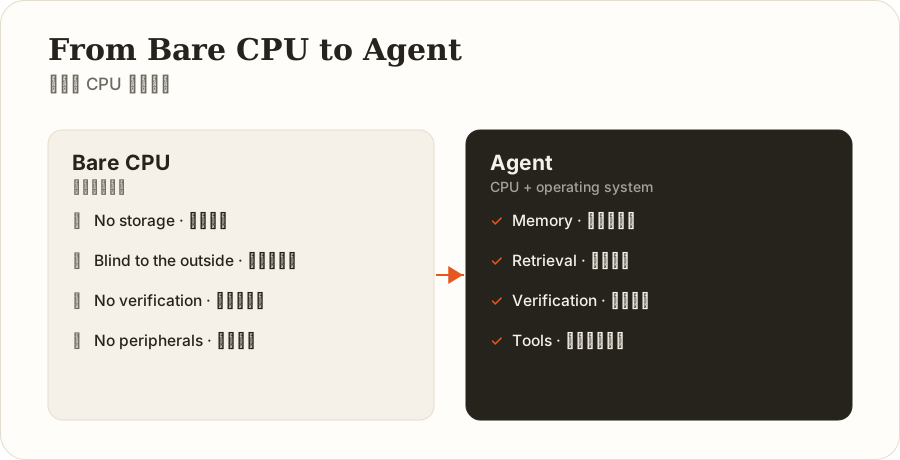
The model’s situation is almost identical. It takes in a stretch of text, computes what’s most likely to come next, and keeps going. This ability is astonishingly powerful, but it comes with the same four “bare machine” shortfalls — note, this isn’t a flaw in any particular model. It’s the necessary consequence of being nothing but a compute unit.
First, it has no storage — once it’s done computing, it forgets. You tell it your name, it responds, and by the next turn that sentence no longer exists for it. The reason a conversation feels continuous is that something, on every single turn, quietly hands the whole prior exchange back to it to read again from scratch. The industry calls this property statelessness — like a machine with no hard drive, starting from a blank slate every time it boots up.
Second, it doesn’t know what’s happening outside. Training ends at some cutoff date, and anything after that is a blank to it: today’s meeting, this week’s exchange rate, last night’s email — none of it. It hasn’t seen your name, your company, or the preference you told it last week, either. It’s like a machine with no network cable and no USB drive plugged in — it can only work with what shipped inside it at the factory.
Third, its output has no verification built in. Its actual job is computing “the most plausible next stretch of text” — not confirming whether that stretch is true. So it can hand you a number that’s perfectly formatted, sounds airtight, and simply doesn’t exist, delivered in exactly the same tone as when it gets things right. Confidence and correctness are two entirely unrelated things that just happen to have been welded together inside it.
Fourth, it has no peripherals. It can write a beautiful email but can’t send it, compute a number but can’t update your spreadsheet, list the three things you need to do but can’t do a single one of them. Everything it produces is text, and only text.
Put those four together and the conclusion is clear: the model is strong on raw compute and missing the whole apparatus that turns compute into productivity. And that apparatus has a name we’re all already familiar with — the operating system.
2. Building the Operating System: Closing the Gaps, One Part at a Time
A bare machine doesn’t become a usable computer by getting a faster CPU — it becomes usable when you install an operating system and attach memory, storage, and peripherals. The birth of the agent is almost a rerun of the exact same story: close those four gaps above, one part at a time.
Fix “no storage”: install memory and a hard drive. Since the model resets its memory every single turn, something has to be responsible for putting whatever it needs to know back in front of it before each turn starts. This splits into two layers. What happens within this one task is called short-term memory — the equivalent of RAM, cleared once the job is done. What needs to persist across many tasks — your preferences, project background, the corrections you’ve made before — is called long-term memory, the equivalent of a hard drive: it lives somewhere else and gets loaded in only when needed. That feeling of “it’s getting to know me better” isn’t the model becoming more perceptive — it’s that someone built it a filing cabinet.
Fix “doesn’t know what’s outside”: plug in a network cable. Rather than let the model guess at something it doesn’t actually know based on how it “feels,” it’s better to have it look the answer up first and then respond based on what it found. This is exactly why a well-designed agent, faced with something uncertain, defaults to “let me check” rather than “let me guess from memory.”
Fix “no peripherals”: install drivers and interfaces. The system wraps real-world actions — “search,” “read a file,” “send an email,” “run code,” “edit a spreadsheet” — into interfaces the model can call. The model itself still can’t touch anything, but it can write out, in text, a kind of request form — “I’d like to use the search tool, here are the keywords” — and the surrounding system actually carries that out and feeds the result back. This is the first point where the model actually makes contact with the real world, and it’s where its “hands” come from.
Fix “no output verification”: add a quality-control step. Since confidence and correctness aren’t necessarily connected, the model can’t be allowed to just say “done” and have that be the end of it. There needs to be a separate layer of checking: did the file actually get generated, did the data actually get changed, does the result actually match the source material. What matters about this layer is that it isn’t swayed by how confident the model feels about itself — the same way a memory parity check doesn’t wave something through just because the CPU thinks it computed correctly.
At this point the machine can remember, get online, take action, and be verified. But it’s still missing the most critical piece — the scheduler.
Real tasks rarely get done in one step. Tell it “research three competitors,” and it has to search, read, judge whether it has enough information, search again if it doesn’t, and only write once it does. That takes a loop that never stops turning: think a step, act on it, look at the result, think about the next step, over and over, until the task is done or it hits something that needs a person to decide. That loop is the system’s heartbeat — it’s what the scheduler in an operating system does: decide what to run right now, then look at what happened and decide what to run next. The heartbeat deserves its own slow-motion look, which is what Section 4 does.
Once the heartbeat is running, there are two more parts that are “nice to have but never optional.” One is task management: something has to define what “done” looks like, or the loop just keeps spinning — “go research this” has no finish line on its own; only something like “find three competitors, list three advantages and the price for each, write it up as a one-page summary” does. The other is planning: work with a clear, fixed sequence of steps (drop the client name and amount from 50 contracts into a spreadsheet) can follow one steady, efficient pipeline; work with no clear sequence (“find out why sales dropped this month”) needs the model to search as it goes and decide the next move along the way — the path gets built while the work is happening, not written down in advance.
The last part is the one most easily overlooked, but it’s the one that decides whether things go badly wrong: the permission system. Once the model actually has hands and can change something real, the cost of a mistake stops being “said the wrong sentence” and becomes “actually did the wrong thing.” So there has to be a separate layer of rules governing what it can touch, what needs a person’s sign-off first, whether there’s a record of it, whether it can be stopped, and whether it can be undone. This layer can never rely on the model to “use good judgment” on its own, because it doesn’t have judgment — it’s just computing the next word probabilistically. The real constraint has to sit somewhere the model can’t reach: the permissions-and-tools layer.
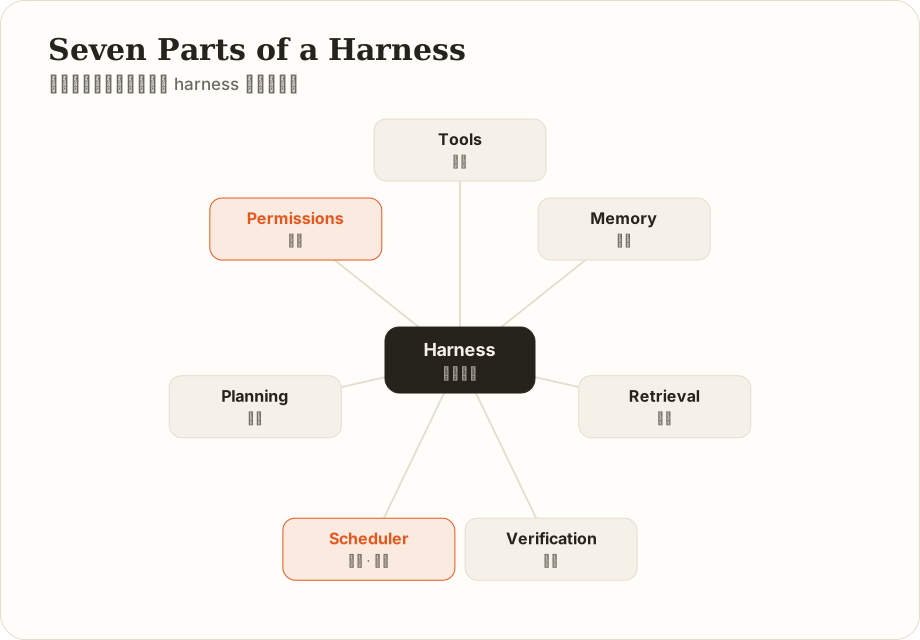
Stack all these parts together — tools (peripherals) · context and memory (RAM and hard drive) · retrieval (the network cable) · verification (quality control) · the loop (the scheduler) · goals and planning (task management) · permissions and guardrails (the permission system) — and that’s the full parts list of a harness. This isn’t a list assembled at random; it’s the necessary inventory you’d derive by working backward from the shape of those four gaps: miss any one piece, and some category of task will fail at some step. That’s not bad luck — it’s structural.
This metaphor also punctures something marketing copy likes to blur: a harness isn’t a “more thoughtful partner” — it’s infrastructure. An operating system doesn’t make a computer smarter; it just makes the CPU’s compute usable, controllable, and coordinatable. In the same way, a harness doesn’t make the model reason better; it just makes the model’s reasoning ability something that can be used safely and continuously. A top-of-the-line CPU running a terrible operating system still freezes and crashes; a state-of-the-art model paired with a sloppy harness still falls apart by step five.
3. Where This Metaphor Breaks Down
Every metaphor breaks down somewhere, and this one has three places worth watching for.
First, the scheduling complexity is different. A real operating system usually has to juggle several concurrent programs at once, while an agent’s harness is, most of the time, serving just this one job — the scheduling problem is far less complex.
Second, an operating system doesn’t care about correctness; a harness has to. A real OS doesn’t much care whether the result a program computed is actually right — its only job is to keep the program running. A harness, by contrast, has a dedicated verification layer whose whole purpose is confirming whether a result is actually true — more like a quality-control department bolted on top of the operating system, something a real computer has no precise equivalent of.
Third, and most fundamental: a CPU is deterministic, a model is probabilistic. Feed a CPU the same input and it computes the same output, every time. Ask a model the same question twice and you might get two different answers. This is exactly why a harness has to invest so heavily in error handling and evidence-checking — a real operating system dealing with an orderly, rule-following CPU never has to worry about any of that.
Keep these three boundaries in mind and the metaphor won’t get overstated — it’s still the best mental picture available for building good intuitions right now.
4. How the Heartbeat Actually Beats: One Turn of the Scheduler, Slowed Down
The loop deserves its own slow-motion pass, because it’s the hardest line dividing “chatting” from “getting things done.”
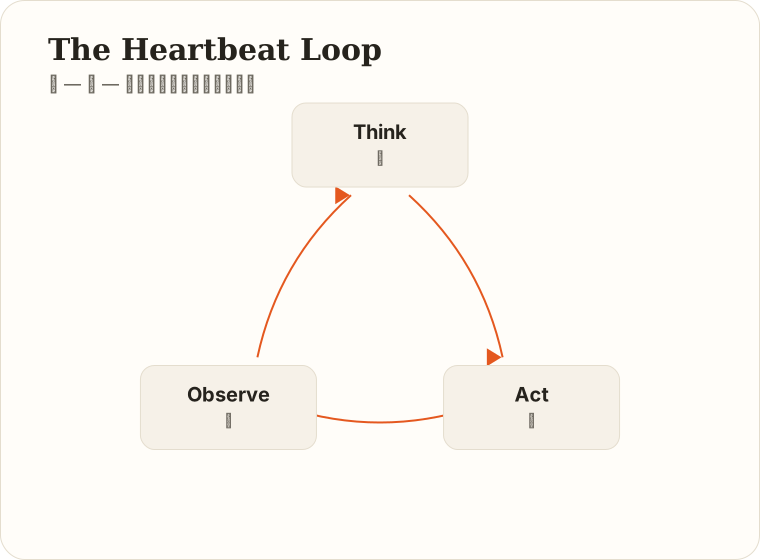
The industry term is “think — act — observe” (also called ReAct: reasoning, acting, observing) — in plain terms, three things cycling on repeat: think about what to do, actually do it, look at what happened as a result, and think about the next step based on what you just saw. Repeat until the task is done or it’s time to hand things back to a person.
Let’s walk through “research three competitors and write a summary” again. The system first packages up the task, the tools available, and any existing background information, and hands it to the model. The model thinks, “I need to search for information on these three companies first,” so it requests the search tool; the system actually goes online and searches, and feeds the raw results back. The model reads through three pieces of coverage and notices that one key figure in one of them has no cited source, so it thinks, “I need to check this one separately,” and searches again. This repeats for a few rounds until the model judges that it has enough material, at which point it writes the summary and saves the file — goal met, loop stops.
Here’s a detail that’s easy to overlook but decides whether the whole thing succeeds: the two moves between step two and step three don’t exist at all in a chatbot. A chatbot only ever does “think” and “say.” What an agent adds — “act” and “observe” — is exactly what sets it apart from chatting. It isn’t guessing at the next nice-sounding sentence; it actually carried out an action, and then folded the real-world consequences of that action back into its own judgment.
And it’s precisely because of that added “observe” step that the loop is where things most easily go wrong. Suppose in some turn the system doesn’t actually look closely at the result — say, a tool returns an entire webpage and the model, cutting corners, only skims the headline and assumes it’s read the whole thing, then keeps going based on an error buried in that headline. That’s “thought it looked but didn’t really” — and the model itself has no idea, so it just carries the wrong conclusion forward. This is also exactly why a later piece will make a point of saying “don’t just trust it when it says it’s done — make it show evidence”: by design, this loop can’t afford to take self-reporting as truth.
Keep this loop in mind. Every part described earlier exists to make this heartbeat beat accurately and steadily: tools give “act” something to act on, memory and context give “think” something to think with, verification gives “observe” something clear to see, and permissions make sure that if the heartbeat runs away, it can still be stopped.
5. So What’s Actually Revolutionary About This
The mechanics are covered. I want to spend one more section on a bigger question, because it determines how seriously you should take all of this: is this wave of agent hype just another tooling upgrade, or is something genuinely different happening?
My read is that three things have permanently changed. And it’s worth flagging carefully: the revolutionary part isn’t “it got smarter” — quite the opposite, it’s at the level of the interface.
First, the boundary of “what AI can do” has jumped from “generate text” to “change the state of the world.” A chatbot’s output always stops at a piece of text — everything between that text and an actual outcome is still your job: copy, paste, tweak, send. An agent crosses that line — its output is no longer text, but a real change in some state of the outside world: a file that actually got created, an email that actually got sent, a spreadsheet that actually got edited. Crossing that line changes the nature of the thing: for the first time, “is AI useful” can be measured directly — not by “does it sound polished,” but by “did the thing actually get done.”
Second, for the first time, software is starting to adapt to people, instead of the other way around. This is the one I think is most underrated. For the past thirty years, the way we use software has never changed: the software decides how it works, and you learn it — learn Excel’s functions, a CRM’s fields, where the buttons are in an approval system. Every piece of software charges you a learning fee, and that fee doesn’t transfer between programs — being good at one company’s expense system doesn’t help you at the next one. Agents flip this around: you say “turn this month’s invoices into an expense report,” and it goes and learns how that system works. For the first time, the cost of “humans learning software” has a real chance of being compressed.
That also explains a phenomenon that looks small but actually matters a lot: the agent products that have genuinely taken off over the last two years usually aren’t the most capable ones — they’re the ones that dropped the barrier to entry the furthest. Taking something out of a black command-line window and putting it into a simple interface, or packaging it so it just works the moment it’s installed — because what they’re cutting is exactly that learning fee, giving someone who doesn’t write code, for the first time, something that actually acts on their behalf. Software is shifting from “a set of operations you have to learn” to “something you can just delegate to” — that’s a shift in the interaction paradigm, and shifts in interaction paradigms have historically always mattered more, in the long run, than shifts in raw capability.
Third, for the first time, the working relationship can compound. Traditional software’s value curve is flat — you using Excel today and using it three years from now, it knows exactly as little about you both times. Agents have memory: correct it once — “our reports always lead with the conclusion, then the reasoning” — write that into long-term memory, and every time after that, it’s already done. The longer you use it, the better it fits you; that’s an upward curve. From this you can draw a practical conclusion: don’t judge an agent by how good it is on day one — judge it by day thirty. A product that dazzles on day one but remembers nothing may end up worth less, long-term, than one that’s mediocre on day one but keeps accumulating.
Having said all three, a splash of cold water is necessary, because the most expensive mistake in this wave of hype is putting the revolution at the wrong layer. The revolution is happening at the interface layer, not the intelligence layer: that CPU is still the same CPU — it still doesn’t know what’s happening outside, it still confidently states things that are wrong, it’s still probabilistic. What’s actually changed is only the system around it that lets it act.
This implies two things. One: none of the model’s old flaws have gone away — they’ve just moved to a different place to show up. It used to fabricate a data point and you could tell at a glance; now it might misjudge its own progress and genuinely believe it’s finished, and you never saw the process. Two: the more capable it gets, the more someone needs to check its evidence, set its boundaries, and keep the ability to stop and undo it. Handing it a job doesn’t mean handing over your judgment and final responsibility along with it — whatever goes out under your name is still your problem if it goes wrong.
This isn’t meant to dampen the hype — quite the opposite: only once you know exactly which layer the revolution is happening at do you know which layer you need to be putting your effort into.
6. Why the Same Model Can Power Two Wildly Different Products
With the ruler from the last section in hand, a common source of confusion makes sense now.
We’re used to judging an AI product by “which model does it use,” but that instinct is especially unreliable when it comes to agents — because the gap between skeletons is much bigger than the gap between models.
This makes perfect sense once you put it back in the operating-system frame: what makes a computer good to use was never just clock speed — it’s largely the operating system. Put a bloated, laggy system on a chip and a lean, smooth one on the same chip, and the experience can be worlds apart. It’s the same with models — the same CPU, paired with a chaotically orchestrated skeleton with verification in name only versus one with a steady heartbeat and rigorous quality control, can produce deliverables where one works and the other doesn’t. Engineering teams keep observing this too: without swapping the model at all, just rebuilding the system around it can push the same agent’s benchmark ranking up dramatically.
That’s why so many products slap a chat window on something and call it an “agent,” while so few can actually deliver work reliably: what’s usually lacking isn’t the CPU — it’s the operating system wrapped around it. So how do you tell the difference? That’s the next section.
7. How to Choose an Agent That Actually Fits Your Needs
This is, I think, the most practical section of this piece. The products on the market change every week, so I’m not going to give you a shopping list — I’ll give you criteria instead, because criteria stay valid a lot longer than any product does.
Step one: ask yourself three questions before you look at any product.
What do I actually want it to touch? Just reading material, organizing information, drafting — or do I need it to actually edit files, send messages, operate other systems? This one question decides how thick an operating system you actually need, and it shapes every other trade-off after it. A lot of people’s real need stops at the first category, but they go shopping as if they needed the second, and end up buying a bunch of risk they don’t need.
If it gets these actions wrong, can they be undone? Editing a draft is reversible; sending an email isn’t. How many irreversible actions are involved determines how strict you need the permission layer to be.
How much am I willing to let it see? This is the question most likely to get skipped, and the one most worth asking first. An agent’s ceiling on capability is set by what you let it see and touch — but everything you let it see also enters its operating range: contracts, client lists, financial data, your inbox. How far you’re willing to open that door directly decides which category of product you should be choosing.
Step two: understand the four categories, each with its own trade-off. None is better than the others — they’re just different trades:
| Form Factor | Example | Advantage | Cost |
|---|---|---|---|
| A chat product with tools bolted on | The web-search and file-reading features on mainstream AI assistants | Zero barrier to entry, usable right away | Strictly speaking, not really an agent — no continuous heartbeat, can’t handle long-running work |
| Self-hosted, local | Open-source, self-assembled agents | Your data stays on your own machine, fully customizable, pay by usage | Requires real effort to set up; if something breaks, you fix it yourself |
| Desktop app | An agent client installed on your computer | No commands to type, works right after install | Capability is bounded by the product’s own design |
| Always-on, cloud-resident | The kind that lives in the cloud and can start working on its own | Most hands-off — it’s still working after you close your laptop | Your data and login state live on someone else’s machine; subscription costs run higher |
The most important column in that table is “Cost.” My recommendation is to choose along the line of “how much am I willing to let it see,” not “whose feature list is longest.” One concrete rule of thumb: if you’re handling client records, contracts, or undisclosed financial data, then “which machine is the data actually sitting on” outranks any feature comparison.
Step three: measure the skeleton with seven questions. None of these require you to understand the technology — but they’re enough to tell “a real agent” apart from “an upgraded chat box.” Ask a salesperson, or just try it yourself for ten minutes:
- Does it have a heartbeat? Can it carry out multiple steps on its own — check something, see the result, decide the next step — or does it just answer one question at a time?
- Can it actually be stopped? If I hit stop halfway through, does it really stop? And does whatever it had gotten done so far still stick?
- Can it roll back? If it changes something incorrectly, is there a way to undo it back to the earlier state?
- Can I see what it actually did? Is there an inspectable action log — what tools it used, what it looked up, what it changed? This is the single best indicator of how solid a product actually is.
- Are permissions tiered? Does it treat every action the same, or does something like “send, pay, delete” get flagged and blocked separately?
- Does the confirmation prompt actually give me what I need to decide? Is it just “allow this?” — or is it “here’s what I’m about to change, here’s the before and after”? A product that only lets you click “yes” blindly has a safety mechanism that’s pure decoration.
- Does it actually remember? A rule I taught it — does it still hold next week? Can the memory be viewed, edited, deleted?
Of the seven, if you can’t get a clear answer on questions 1, 2, or 4, it’s probably not an agent — it’s a chat box with some tools bolted on.
If you only remember one line, remember this one: check first whether it’s willing to let you see, then whether it’s willing to let you stop it, and only then how much work it can actually do. The reasoning is simple: how much work it can do is the fastest-moving part of any product — it changes in months. But “observable, stoppable” is a design philosophy — if it’s not there from the start, it’s very hard to bolt on later.
One last note on cost. Agents bill by “how much work got done,” not by “whether you’re using it,” which produces a counterintuitive effect: the smoother it feels to use, the faster the bill climbs. And a lot of the waste is invisible — a task with a vague goal might run itself for fifty steps on its own; a context stuffed with irrelevant material means every turn is billing you for stuff you didn’t need. So ask one more question when choosing: does it show me what this run actually cost? A product that won’t even show you the tab is one you can’t manage the cost of.
8. Back to That One Word: “Can It Act”
We opened by asking: why can one AI only chat with you while another actually goes and runs errands for you?
The answer is clear now. The difference isn’t about which chip is smarter — it’s about whether there’s an operating system built around that chip, and how complete it is — the system that fixes those four gaps (“no storage, no awareness of the outside world, no output verification, no peripherals”), letting it remember, get online, take action, be verified, and be stopped if something goes wrong. So the next time someone tells you “we’re using the most powerful model,” you can ask one more question: and how does the system around it handle scheduling, permissions, and verifying results?
Three takeaways to carry with you:
- Don’t just ask “which model are you using” — ask “how is the operating system around it built.” A product running an ordinary model on a solid skeleton can easily be more trustworthy than one stacking the strongest model on top of a skeleton that can’t even manage permissions properly.
- When choosing a product, check observability and stoppability first, then check how much work it can do. The former is a design philosophy; the latter is a rate of iteration — the latter will catch up over time, the former won’t.
- The revolution is happening at the interface layer, not the intelligence layer. None of the CPU’s old flaws have gone away — they’ve just moved to a different place to show up. The more capable it gets, the more someone needs to check its evidence and set its boundaries.
CPUs will keep getting stronger, generation after generation — that’s not something you need to worry about. But knowing how to build it the right operating system, how to hand off work clearly, and how to hold your own boundaries while it does its job — that’s the capability that’s genuinely yours to build.
The next piece picks up exactly this thread: a method called 5E, laying out how work should actually be handed off, where to check in along the way, how to sign off on the result — and the mistake nearly everyone makes: why the “allows” you clicked are quietly expiring.
Sources
- The “model as CPU, harness as operating system” metaphor and the breakdown of harness components: synthesized from multiple 2026 engineering analyses of agent harnesses, with some variation between how each source breaks it down
- The think-act-observe loop (ReAct: reasoning, acting, observing): public research and engineering practice on this paradigm
- The four agent form factors (chat product with tools bolted on / self-hosted-local / desktop app / always-on cloud-resident): compiled from public product information as of 2026
- The engineering case of “rebuilding the skeleton alone, without changing the model, produces a large ranking jump”: publicly reported; consult the original source for the specific benchmark and ranking
Note: passages in this piece marked “my read” or “I think” are opinion; everything else is traceable public information. Products mentioned are cited only as examples of form factors, not as recommendations — this space moves fast, so check the official information at the time you’re actually using something.